Wednesday, April 29, 2009

Tech Tip: Dimensioning to an arc-shaped cut of a cylinder

A warning may appear when trying to add a dimension in the drawing to an arc-shaped cut of a cylinder.

The feature was made by extruding a cut with the following sketch.
Procedure: One way to dimension the drawing is to expand the drawing view in the feature manager and show the sketch. A dimension can be added to the sketch entities and afterwards the sketch can be hidden.

Notes:
Another solution is to create a section view. The section view can be dimensioned without a warning.


Tuesday, April 28, 2009


ModernTech Mechanical's Layoff Payoff Program Featured on WBIR News Knoxville, TN

Click HERE to watch the video!

Monday, April 27, 2009


Webinar: Beat the Recession with DriveWorks Express

Wednesday, April 29, 2009 10:00 AM - 11:00 AM EDT


ModernTech Mechanical is pleased to announce our Beat the Recession with DriveWorks Webinar- Making the most of the tools you have in SolidWorks.
  • Are the products you design the same but different?
  • Do you have repetitive design tasks that could be automated?
  • Could your products be defined by a set of rules?

If the answer is YES to any of these questions, then DriveWorks and SolidWorks could help you dramatically improve your productivity via Design Automation... and the good news is that as an existing SolidWorks user, you already have some of these tools available to you via DriveWorksXpress, which is included in every license of SolidWorks.

And as a special gift to all those who attend, we are pleased to give you FREE copy of the Little Book of Rules - the definitive guide to working with rules to automate your design process.

Register Here: https://www2.gotomeeting.com/register/327733015
Tech Tip: Removing Tangent Edges from Sweeps with “Fit Spline”.

CATEGORY: Part

Have you ever created sweeps, but did not want tangent edges reflected throughout your sweep at every tangent point? You can remove tangent edges through this process:
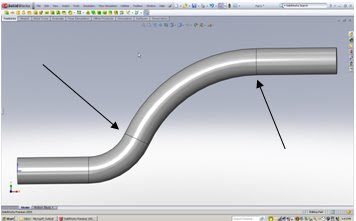
Before - Sweep reflects tangent edges.
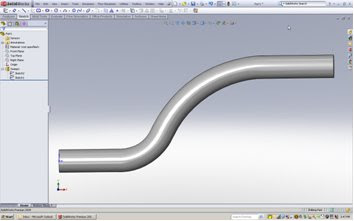
After – Sweep reflect no Tangent Edges
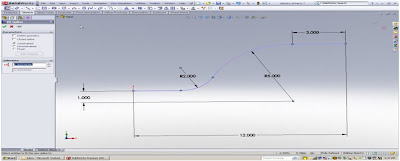

Procedure:
1. Edit the path of an existing sweep or when creating a path for a sweep, “right click” on the sketch and choose, “Select Chain”.
2. Go to the pull down menu and select: Tools, Spline Tools, Fit Spline (or add to short cut menu).
3. Exit the sketch or create your sweep with the new Spline.
4. The resulting “Swept feature” will no longer have tangent edges at each tangent point.
Notes:
Using a Spline initially would have worked also; however, you would not have standard radius dimensions, for arcs and curves if needed for manufacturing or 2D drawings.3D sketches are also very useful when creating sweeps. When creating a surface, a Spline also creates one continuous surface.


Friday, April 24, 2009


Making Data Management Simple with SolidWorks Enterprise PDM

MANAGE YOUR 3D DATA EASILY

Join us for this FREE seminar and explore how SolidWorks Enterprise PDM can help your company manage and share all the data related to your designs more effectively.

Patrick Brochu and Sylvain Trudel of SolidWorks will be joining us to provide valuable insight and answer any of your specific SolidWorks Enterprise PDM questions.

Learn about the benefits of implementing data management into your design process and how your design team can:
  • Manage product data effectively
  • Share design information without compromising integrity
  • Automate workflows
  • Improve collaboration between engineering and manufacturing

Attend and receive the free white paper, "PDM vs. PLM: It all Starts with PDM"

Register Today!

Thursday, April 16, 2009


ModernTech Mechanical Announces 3DVIA Composer Hands-On Test Drives

Attend a 3DVIA Composer Hands-On Test Drive to learn how to seamlessly incorporate design changes directly into your product documentation, and create up-to-date, accurate, printed and interactive materials. With 3DVIA Composer, your entire organization can automate and integrate the documentation process.


Using 3DVIA Composer you can:

  • Eliminate expensive errors and quickly update all product documentation through automation.
  • Get new products to market faster and gain a competitive advantage.
  • Leverage existing 3D designs in multiple CAD formats to produce accurate, up-to-date product documentation.
  • Enable technical and nontechnical staff to collaborate effectively during documentation production.
  • Improve customer service.

Easily create documents such as:

  • Assembly instructions.
  • Customer-service procedures.
  • Marketing materials.
  • User manuals.
  • Field-service repair manuals.
  • Training materials.
  • Web-based catalogs

Register Here: http://www.moderntechmech.com/seminars/handson_3dvia.html

Monday, April 6, 2009


Make your Layoff Payoff with ModernTech Mechanical


It hurts losing your job. You worked hard. You did the right things. You followed all the rules. Still, the economy dealt you a painful blow.


ModernTech Mechanical is here to give you a helping hand. ModernTech Mechanical has joined M Force - the employment professionals and SolidWorks - the leader in 3D CAD technology to bring you the Layoff Payoff Program.


The Layoff Payoff Program provides displaced engineers and designers with FREE SolidWorks 3D CAD software, training, Certified SolidWorks Associate (CSWA) certification opportunities, and job placement services. Created in conjunction with the SolidWorks Engineering Stimulus Package, develop, Upgrade, or Refresh your 3D skills today to help you find the right job.


Payoffs At-A-Glance:

  • SolidWorks Student Design Kit (includes fully-featured SolidWorks Standard) 90-day software trial

  • Free 3 hour hands-on test drive training in a classroom style setting (first-come, first served)

  • Certified SolidWorks Associate (CSWA) certificate (upon completion of passing exam)

  • Job seeker resource guide

  • Premium placement in M Force candidate database

  • Free career placement services through M Force

  • Discounts on Additional SolidWorks training from ModernTech Mechanical

  • Resume writing services from M Force

  • Software with subscription purchase (for you or your new employer) ModernTech Mechanical


Yes it’s free. No gimmicks. No catches. No bull.

To Learn More or Register:

http://www.moderntechmech.com/EngineeringStimulus.html